The only OCR models you will need in 2026
If you are working with complex, unstructured documents and need an OCR setup that can run locally for privacy while remaining reliable across different layouts, this guide is for you.
This post compares reliable OCR models under 3B parameters that can extract structured information from documents for automation systems, agents, and other downstream workflows.
Before comparing models, it helps to define the documents, extraction problems, and deployment constraints involved.
Common document types
Document extraction spans finance, research, healthcare, customer support, and many other domains.
Common inputs include research papers, invoices, prescriptions, forms, and financial reports.
They are either:
- Images created digitally.
- Documents scanned and saved as images.
- Photos uploaded by an end user.
The extracted data can then feed search, analytics, review, or automation workflows.
Here are several common examples:
Datalab OCR benchmark examples
- Research paper
- Invoices
- Forms
- Financial documents
- Unstructured data such as tables, charts, and graphs
- Handwritten literature/documents
Major extraction bottlenecks
-
Poor image quality
Scans and phone photos often come with low resolution, blur, skewed angles, shadows, or compression artifacts, all of which degrade text detection before recognition begins.
For example, a prescription photographed under bad lighting or a faxed invoice re-scanned multiple times can turn crisp characters into ambiguous smudges, causing the model to hallucinate digits or drop characters entirely.
-
Complex document layout
Real documents rarely follow a single-column, top-to-bottom flow. Multi-column research papers, nested tables, forms with checkboxes and side annotations, or newspapers with mixed text and images all confuse models that assume a simple reading order.
A two-column academic paper with a full-width table breaking across both columns is a classic failure case: naive OCR reads left-to-right across both columns and interleaves unrelated sentences.
-
Multilingual content
Models trained mostly on English or Chinese data tend to underperform on scripts with different character sets, ligatures, or right-to-left reading order (Arabic, Devanagari, Thai, etc.), and mixed-language documents make it worse.
A bilingual invoice with English line items and Arabic vendor details, or a form that switches between Latin and CJK characters mid-line, can trip up models that weren't explicitly benchmarked on multilingual data.
-
Context ambiguity
The same visual shape can mean different things depending on context, and OCR alone doesn't know which one applies.
A "0" versus "O", a "1" versus "l", or a handwritten date format (07/08/2026 as July 8 vs August 7 depending on region) all require context the pixels alone don't provide.
This is especially painful in financial documents, where misreading a single digit in an amount or account number has real consequences.
Lightweight OCR models worth testing
Before choosing a model, define whether you need to parse an entire document or only extract a known region of interest.
If the target region is known, a small recognition model can often solve the task with much lower latency than a full detection-and-recognition pipeline.
How an OCR model works
An OCR model works in a two-stage process:
- Text Detection:
- Text detection is the step that answers "where is the text located on this image?"
- The output isn't characters or words, it's spatial: bounding boxes, polygons, or pixel masks marking regions that contain text (lines, words, or blocks), plus often a rough category (title, paragraph, table, formula, header/footer)
- Algorithms: DBNet/PSENet/EAST/CTPN-style FCN segmentation, or a ViT/NaViT-LLM VLM's layout-pass.
- Text Recognition
- This is the step that takes an already-detected text region and outputs the actual characters/words.
- Algorithms: CRNN+CTC (legacy) superseded by SVTR-style pure-ViT recognizers and TrOCR-style ViT-encoder→LLM-decoder (or early-fusion) autoregressive transformers.
Put simply, if you already know the exact ROI (region of interest), you may not need a model that performs both detection and recognition. You can use a recognition model such as PP-OCRv5 Mobile Recognition, which is lightweight and often sufficient.
For more complex layouts and variable inputs, benchmark the models below against representative samples from your own data.
Falcon-OCR
huggingface.co/tiiuae/Falcon-OCR
Falcon OCR is a 300M parameter vision-language model built by TII (the Falcon team) specifically for document OCR, released under Apache 2.0.
_2026-09-02_0111_PM.jpg)
What makes it different is the architecture choice. Most OCR VLM systems are built as a pipeline: a vision encoder produces embeddings, hands them to a separate text decoder, plus additional task-specific glue holding the two together. Falcon OCR skips that entirely.
It's a single, early-fusion, dense autoregressive Transformer. Image patches and text tokens are processed in the same shared parameter space from the very first layer, using a hybrid attention mask: image tokens attend bidirectionally (so the model can look at the whole page at once), while text tokens decode causally, conditioned on the image. One backbone, one decoding path; task switching happens through prompts rather than swapping out modules.
_2026-09-02_0138_PM.jpg)
Given an image, it produces plain text, LaTeX for formulas, or HTML for tables, depending on the output format you request. It runs in two modes: plain OCR for simple documents, photos, slides, and receipts; and a layout-aware mode that first detects regions on the page (via PP-DocLayoutV3) and then runs OCR per region, meant for complex multi-column or dense pages like academic papers and newspapers.
Falcon-OCR is actually part of a broader family called Falcon Perception. The same early-fusion, natively multimodal architecture also powers a separate Falcon-Perception model that does object detection and instance segmentation from natural language queries
_2026-09-02_0108_PM.jpg)
(e.g. "segment the cat on the left" gives you bounding boxes plus pixel masks).
OCR and perception are two applications of the same underlying recipe, just fine-tuned and released as separate checkpoints.
On olmOCR-Bench it scores 80.3% average, competitive with models several times its size (Mistral OCR 3 at 81.7, Chandra at 82.0, Gemini 3 Pro at 80.2), and it actually leads on tables (90.3) and multi-column documents (87.1), all while being roughly 3x smaller than 0.9B-class OCR VLMs like PaddleOCR-VL, with a serving stack (paged inference engine, vLLM Docker image) built for high-throughput deployment.
For a 0.3B model, Falcon OCR punches well above its weight, especially on tables and multi-column docs. It's a solid default if you're optimizing for cost and latency without giving up much accuracy.
GLM-OCR
huggingface.co/zai-org/GLM-OCR
GLM-OCR is a 1B parameter multimodal OCR model from Z.ai (the GLM team), released under MIT, built for complex document understanding.
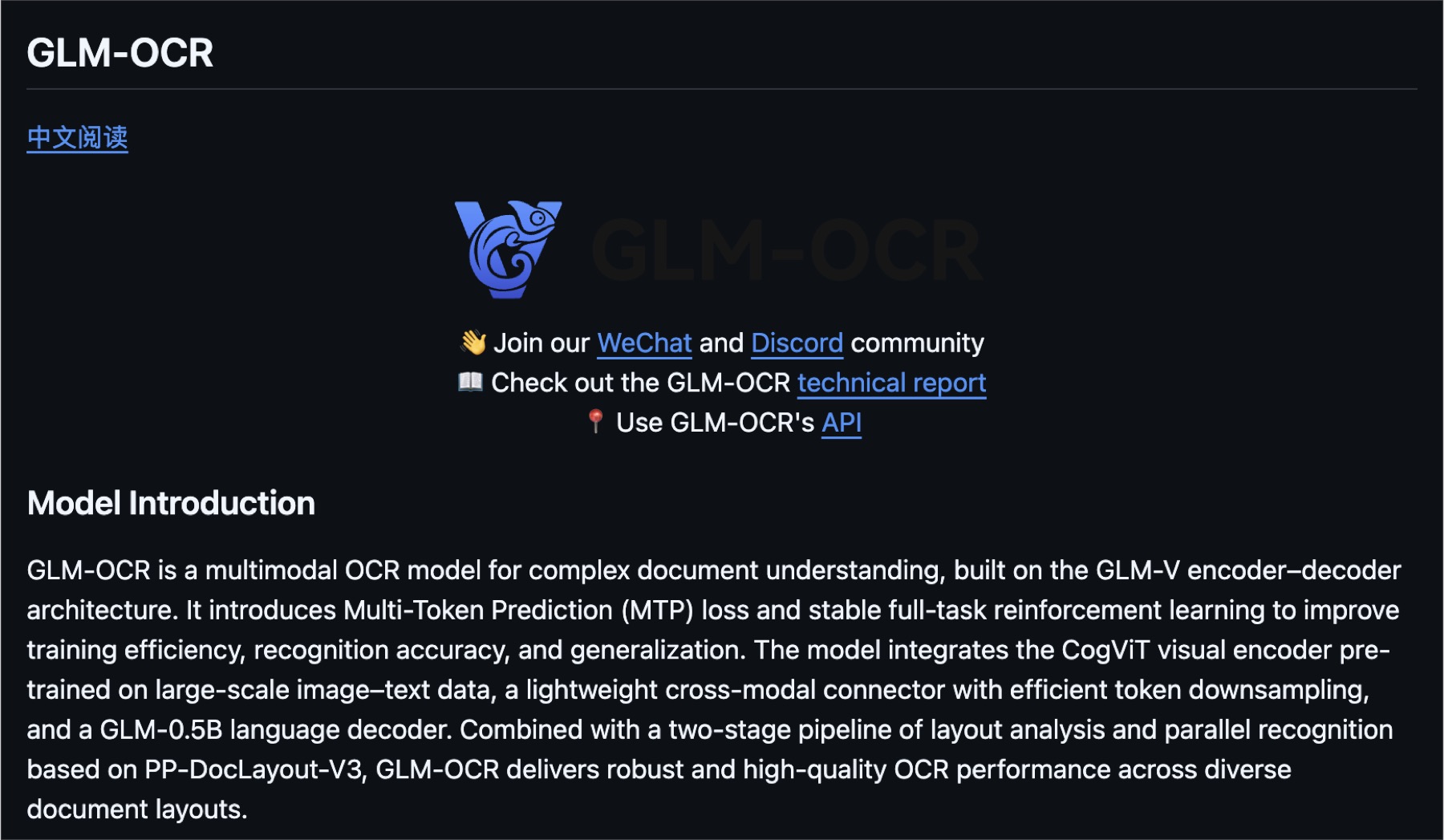
What makes it different is the training recipe layered on top of a fairly standard encoder-decoder setup. It introduces Multi-Token Prediction (MTP) loss and stable full-task reinforcement learning to push training efficiency, recognition accuracy, and generalization further than a typical next-token setup would.
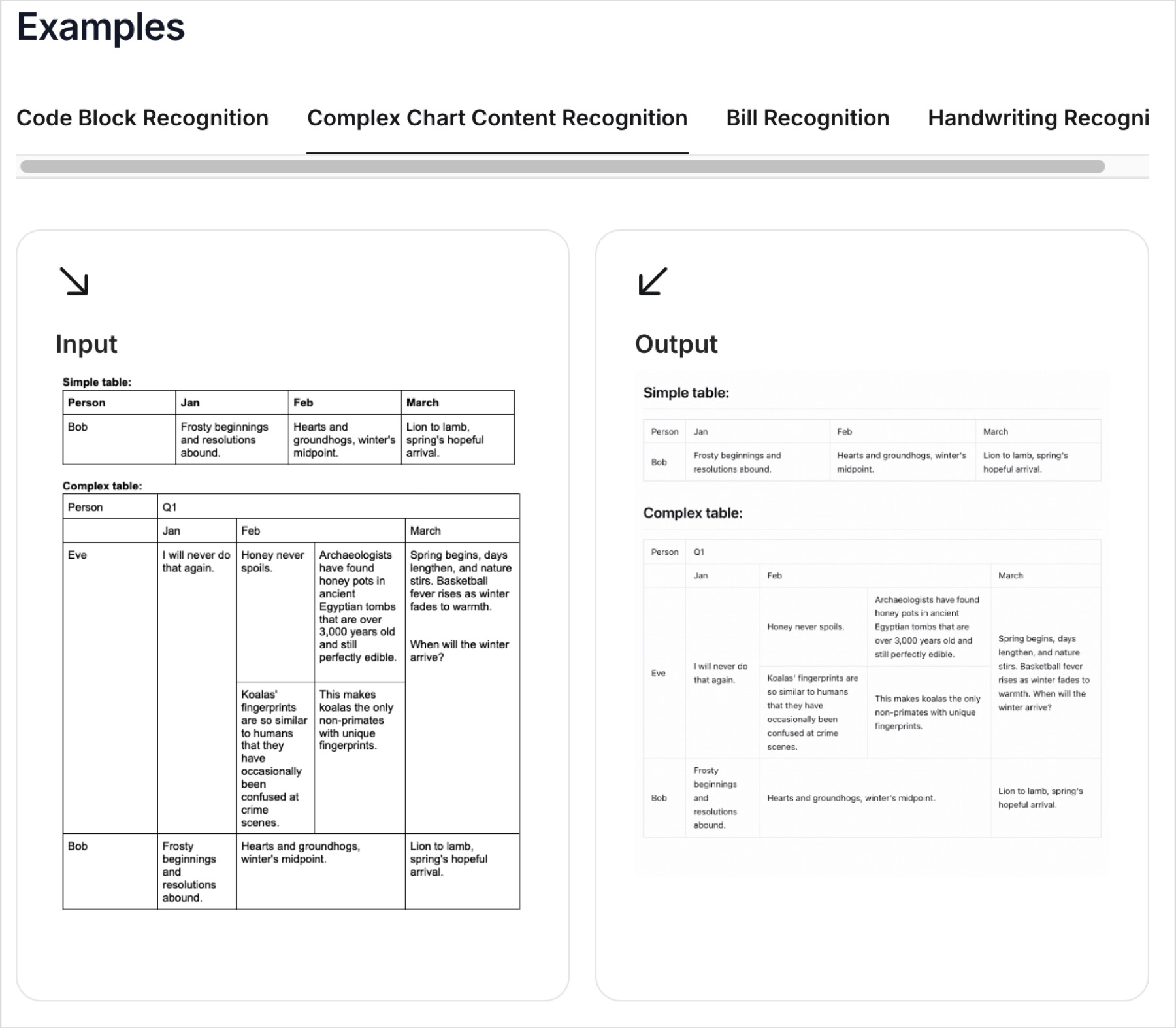
GLM-OCR complex chart recognition guide
Architecturally, it's built on the GLM-V encoder-decoder design: a CogViT visual encoder pretrained on large-scale image-text data, a lightweight cross-modal connector with token downsampling to keep things efficient, and a GLM-0.5B language decoder. It runs a two-stage pipeline of layout analysis (using PP-DocLayout-V3, the same detector Falcon OCR uses) followed by parallel recognition across detected regions.
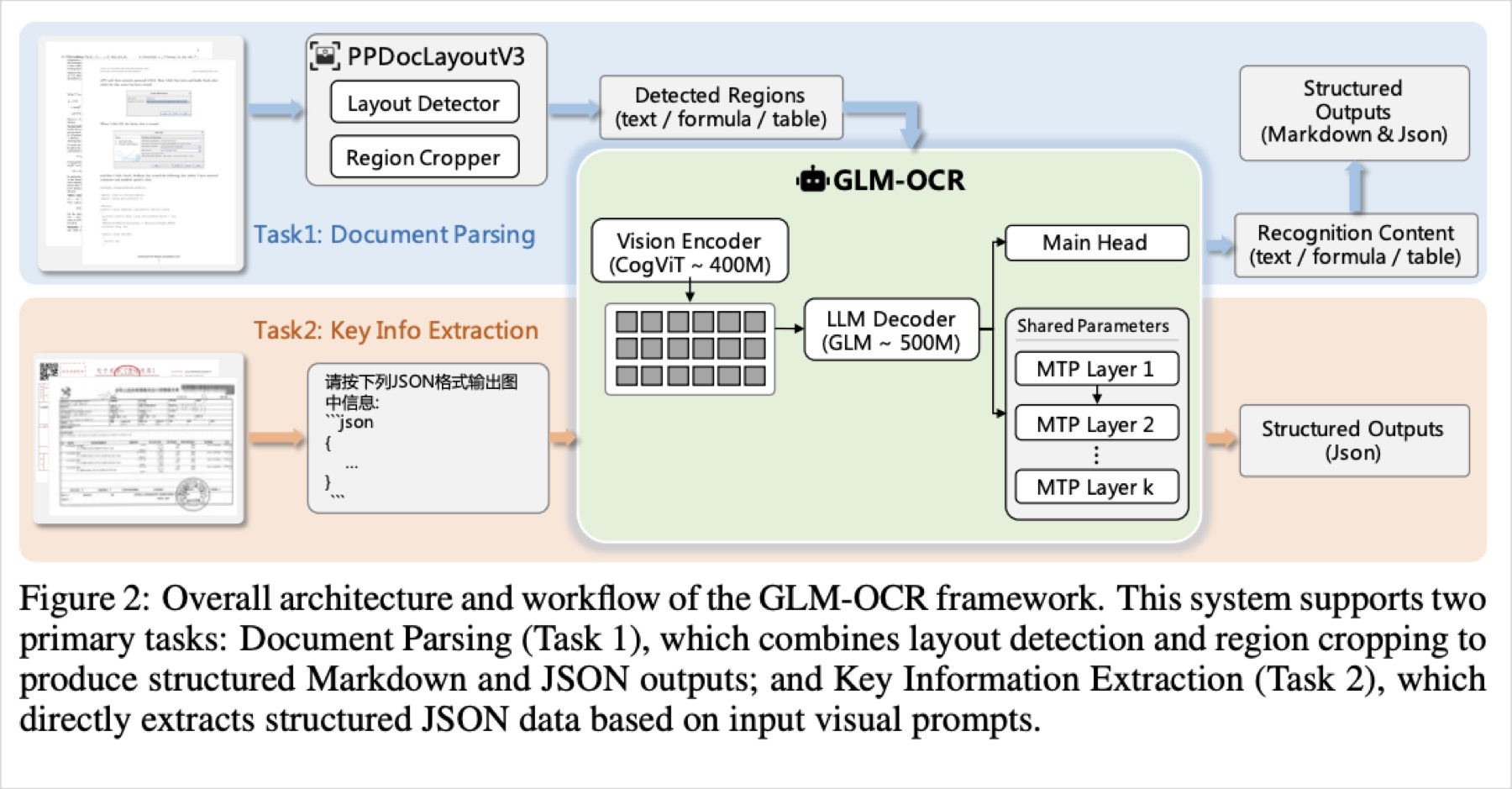
It's optimized for real-world business documents, complex tables, code-heavy pages, seals, and it's built to be cheap to serve: at under 1B params it deploys through vLLM, SGLang, and Ollama with low latency, aimed at high-concurrency and edge use.
On OmniDocBench v1.5 it scores 94.62, ranking #1 overall at the time of release, ahead of much larger general-purpose VLMs on formula recognition, table recognition, and information extraction specifically.
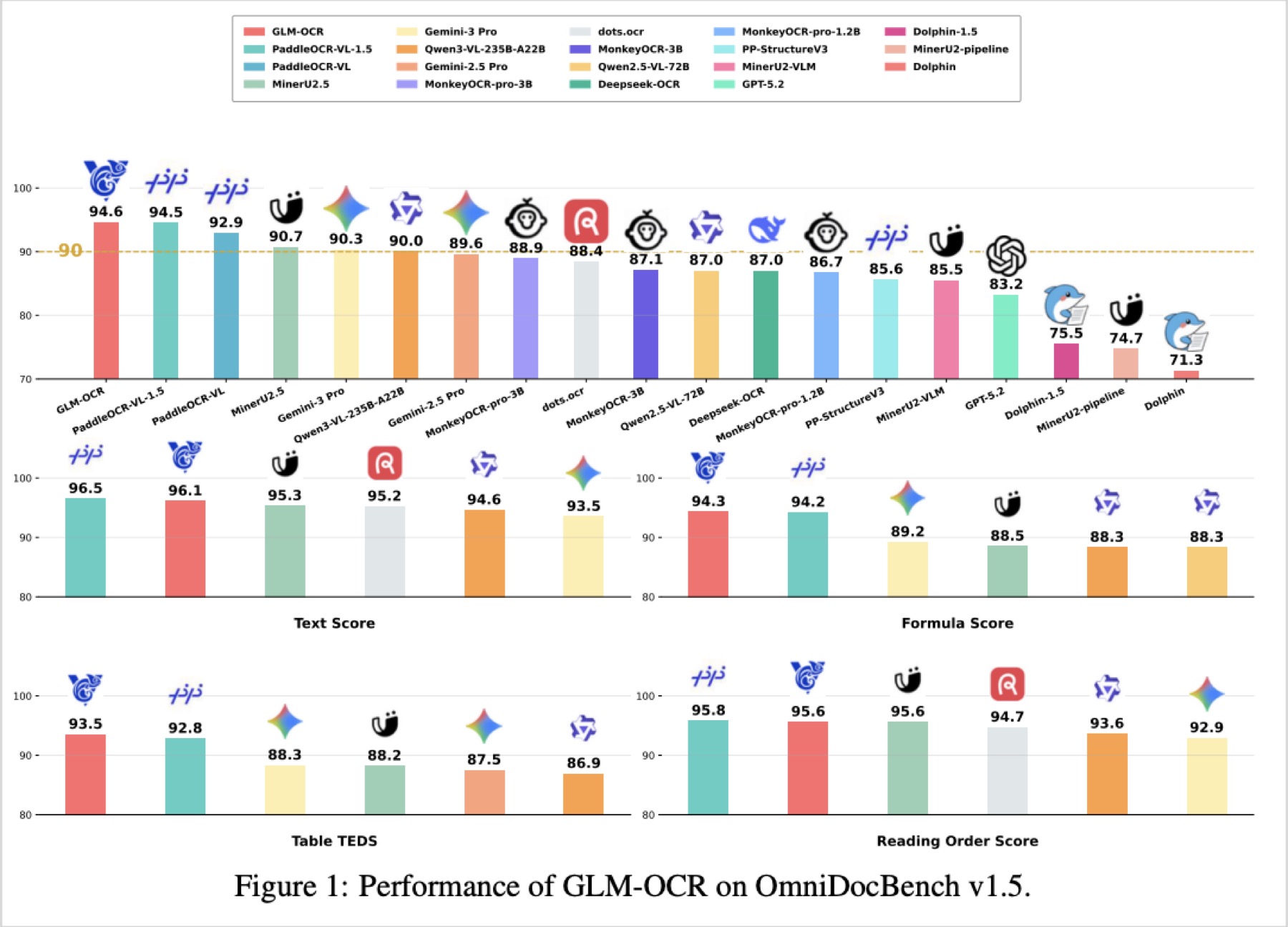
GLM-OCR is a good pick when you want a single model that's fast enough for production and still tops the accuracy charts, especially for messy real-world business documents rather than clean academic ones.
MinerU2.5-Pro
huggingface.co/opendatalab/MinerU2.5-Pro-2605-1.2B
MinerU2.5-Pro is a 1.2B parameter PDF-to-Markdown document parsing model from OpenDataLab, released under Apache 2.0.
What makes it different is philosophy, not architecture. The team deliberately kept the 1.2B parameter architecture unchanged from the base version and pushed performance entirely through data engineering: cleaner layout-detection training data, and a much larger, more targeted dataset for image analysis (charts, flowcharts, seals).
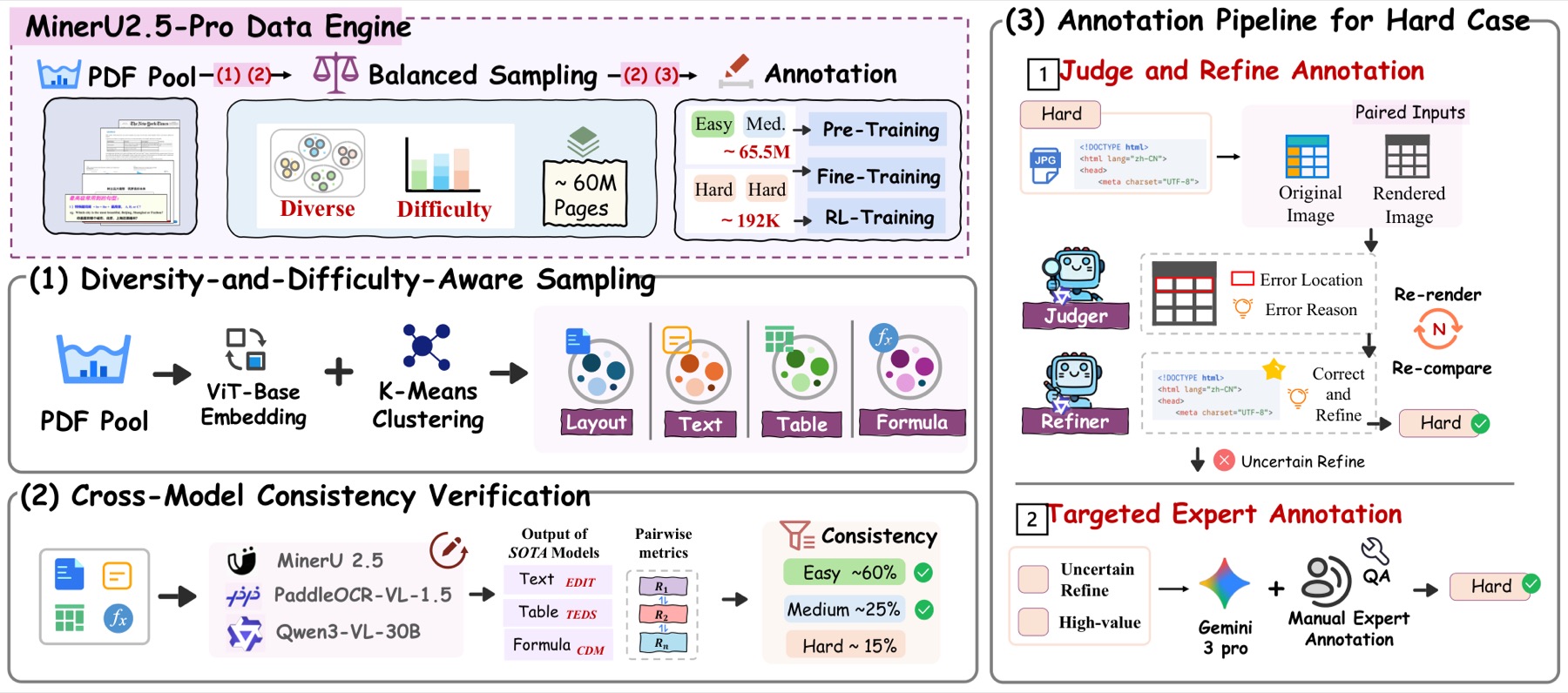
It's a case study in how far a fixed-size model can go on training-data quality alone.
It has reduced category misclassification during layout detection (particularly missed image blocks) and meaningfully improved recognition on charts, flowcharts, and seals, while leaving overall benchmark numbers close to the prior version.
On OmniDocBench v1.6 (full) it scores 95.72 overall, which it claims as SOTA, beating both specialized OCR models like GLM-OCR and PaddleOCR-VL-1.5, and much larger frontier VLMs like Gemini 3 Pro and Qwen3-VL-235B.
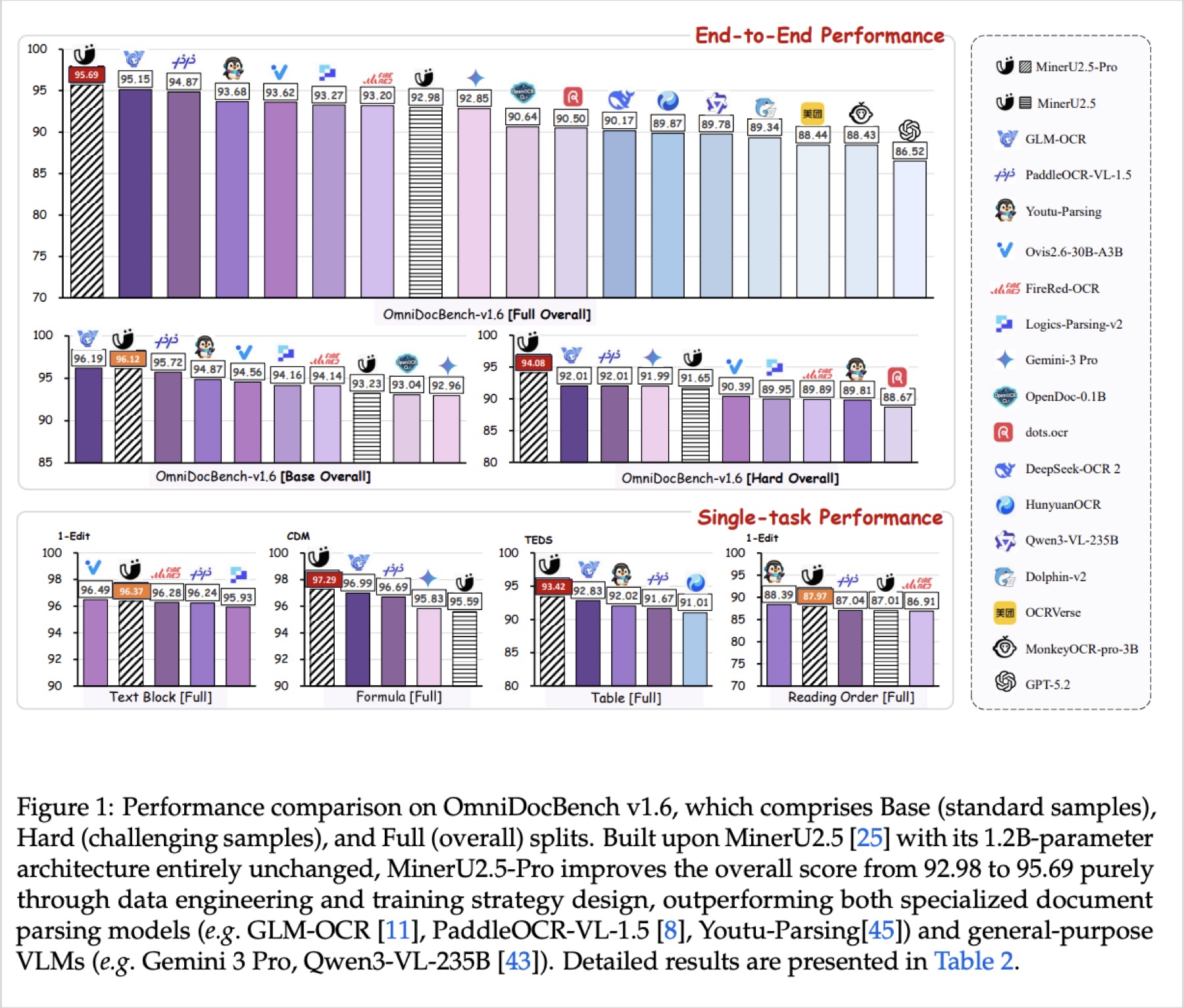
It's a strong reminder that architecture isn't the only lever. If you're stuck at a parameter budget, MinerU2.5-Pro shows how much headroom good data alone can unlock.
Surya-OCR-2
huggingface.co/datalab-to/surya-ocr-2
Surya is a 650M parameter OCR model from Datalab, released under OpenRAIL, positioned as a lightweight, fast, general-purpose document OCR tool rather than a research-frontier model.
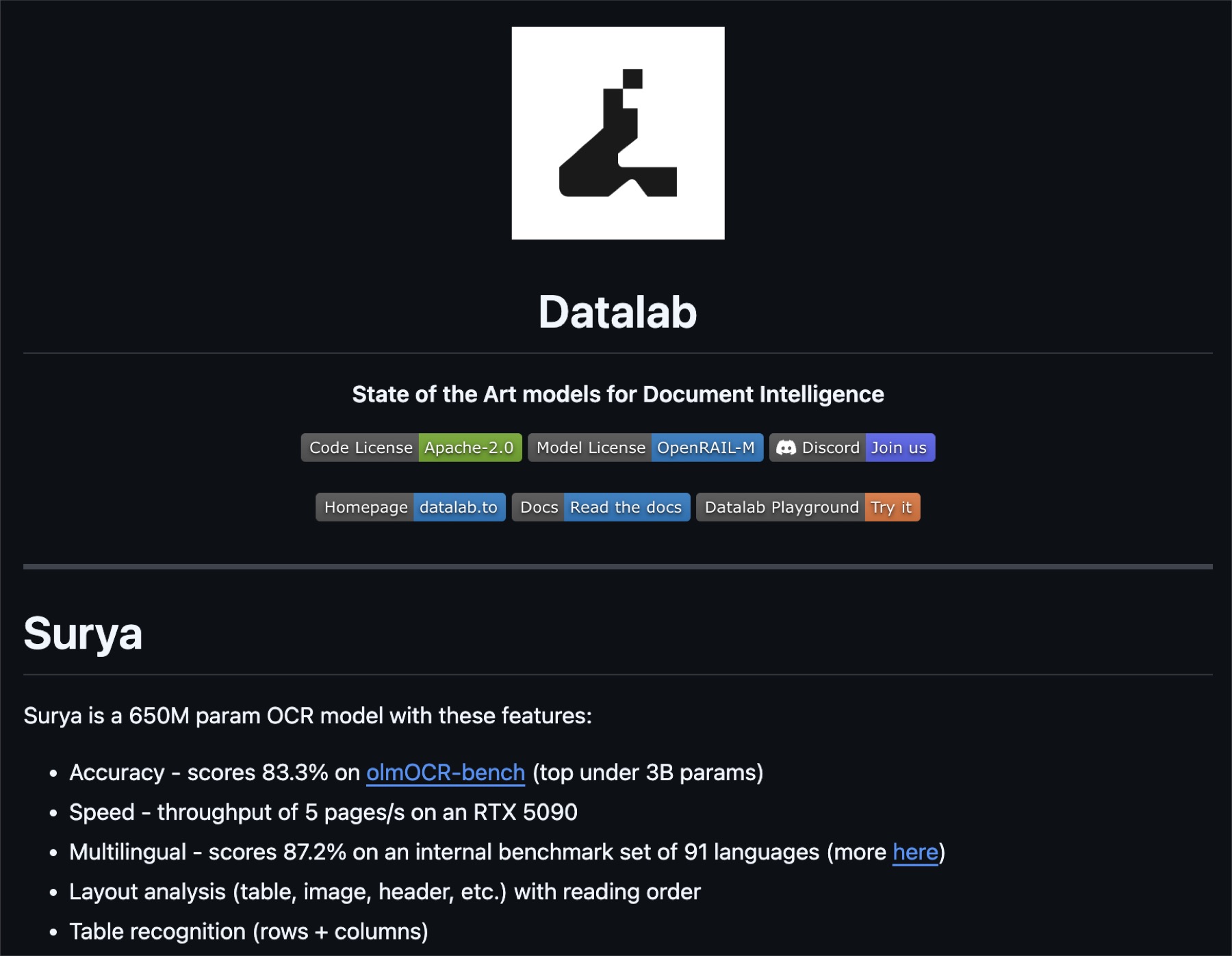
What makes it different is the tradeoff it's tuned for: it isn't chasing the top accuracy score at any cost, it's built to be the best option in the sub-1B, high-throughput bracket while still handling layout and multilingual text properly.
It handles detection and recognition together, does layout analysis (tables, images, headers) with correct reading order, and does table recognition down to rows and columns, all in one lightweight package.
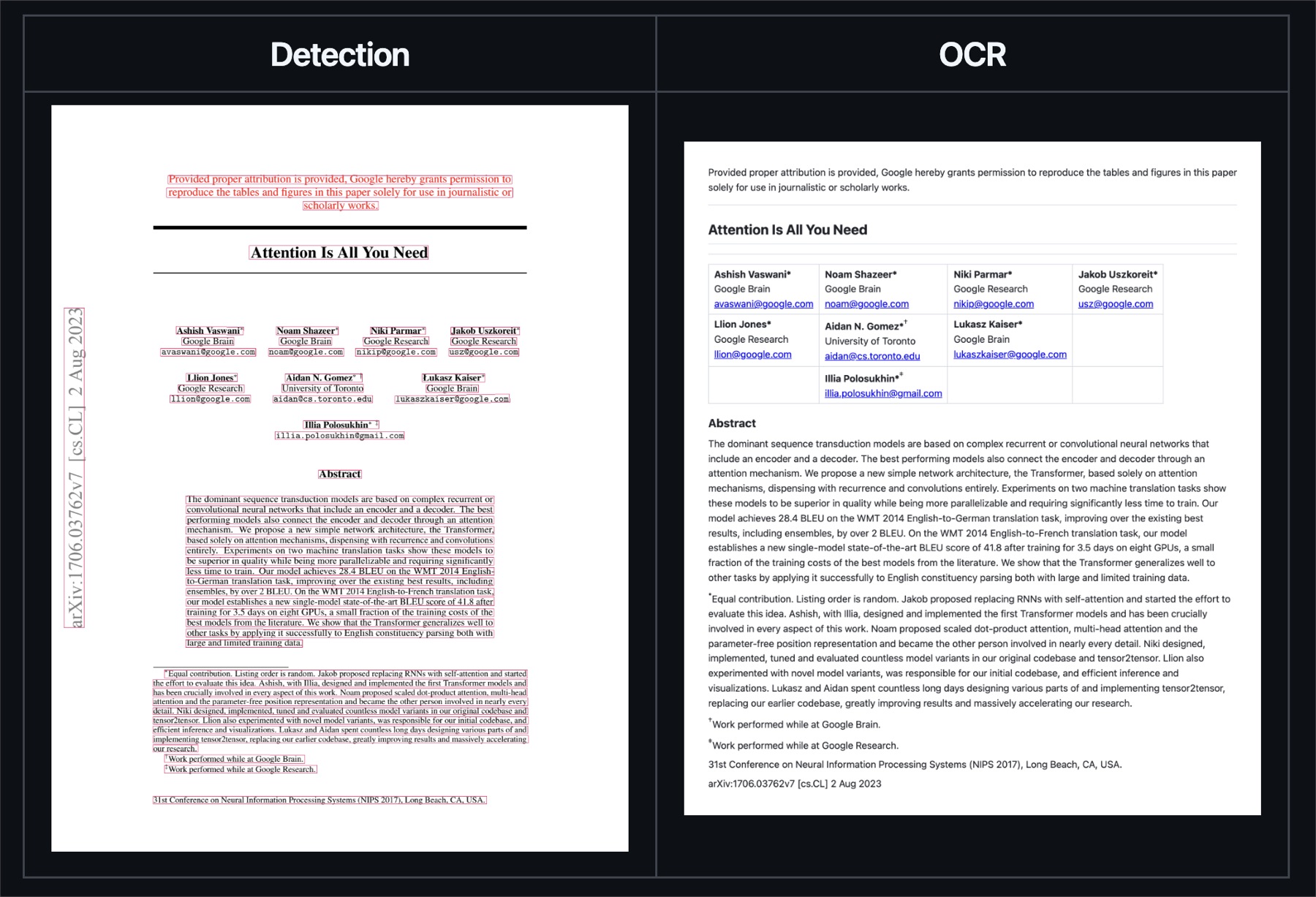
On olmOCR-bench it scores 83.3%, the top score under 3B parameters, while running at 5 pages/second on a single RTX 5090. It also scores 87.2% on an internal 91-language multilingual benchmark, which makes it one of the stronger choices here if your documents aren't all in English. Datalab also runs a hosted, higher-accuracy sibling model called Chandra on their managed platform, for when you need more than Surya gives you locally.
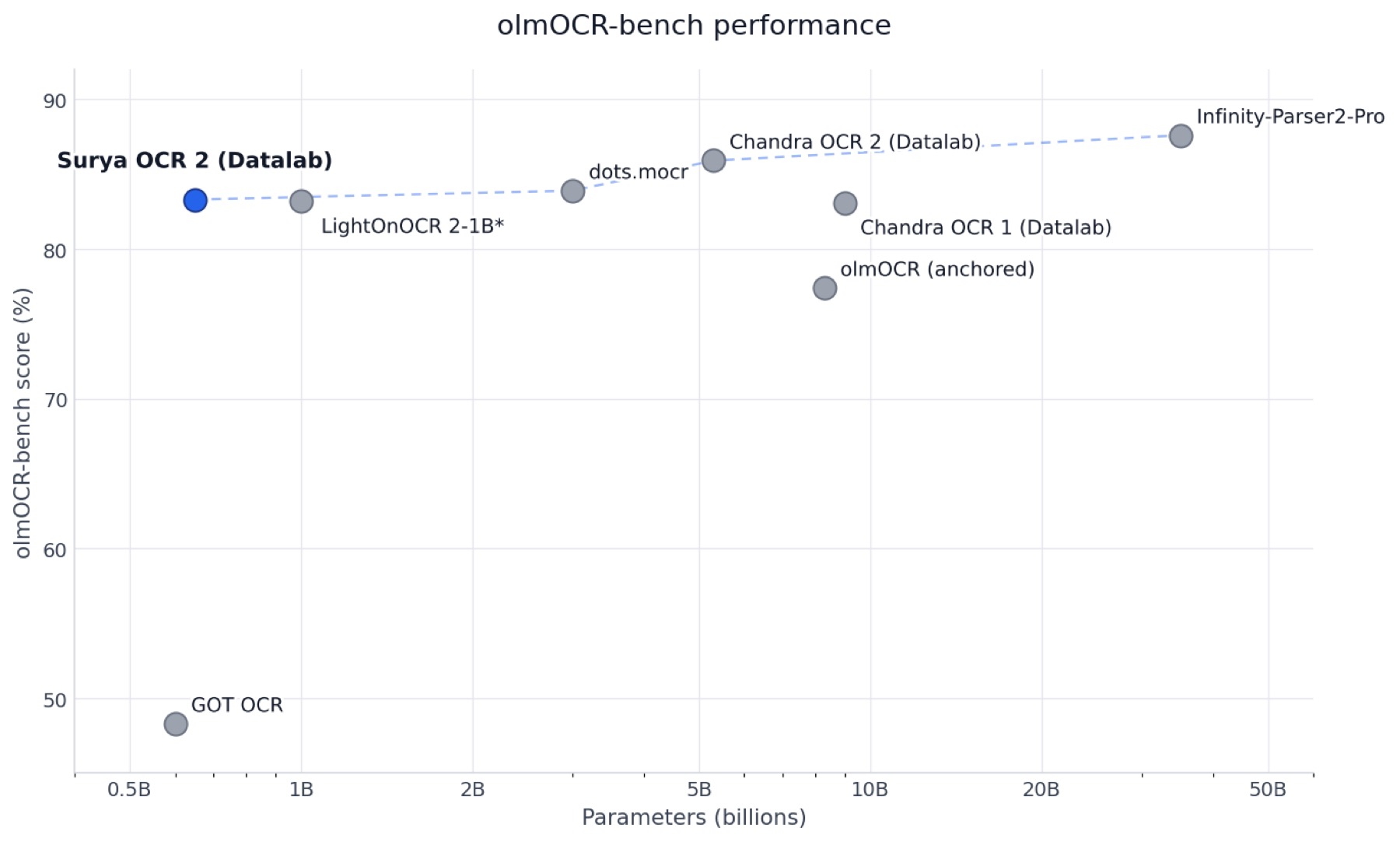
If speed and multilingual coverage matter more than squeezing out the last few points of accuracy, Surya is a strong candidate. Chandra OCR 2 is Datalab's larger model for more complex document problems, but it sits above the parameter threshold for this post.
PaddleOCR-VL-1.6
huggingface.co/PaddlePaddle/PaddleOCR-VL-1.6
PaddleOCR-VL-1.6 is a compact document parsing model from Baidu's PaddlePaddle team, released under Apache 2.0, built on top of PaddleOCR-VL-1.5.
What makes it different is a two-part upgrade recipe on top of an already-strong base: a region-aware data optimization framework that specifically finds the weak regions the previous model struggled with and applies targeted enhancement there, plus a progressive post-training stage using curated data selection and reinforcement learning to push accuracy up in stages rather than in one pass.
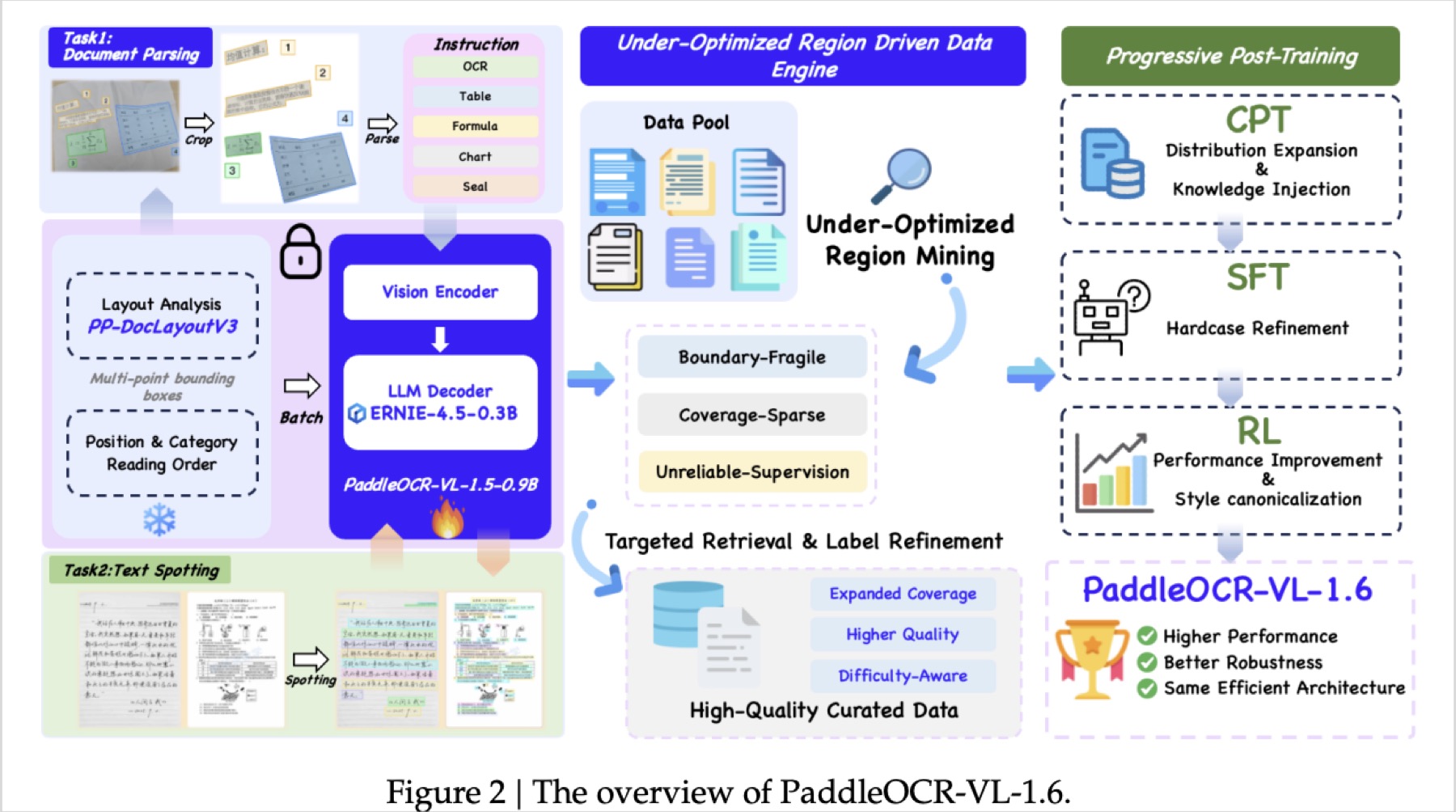
The architecture itself is fully compatible with PaddleOCR-VL-1.5, so it's a drop-in, zero-cost migration for anyone already running the previous version.
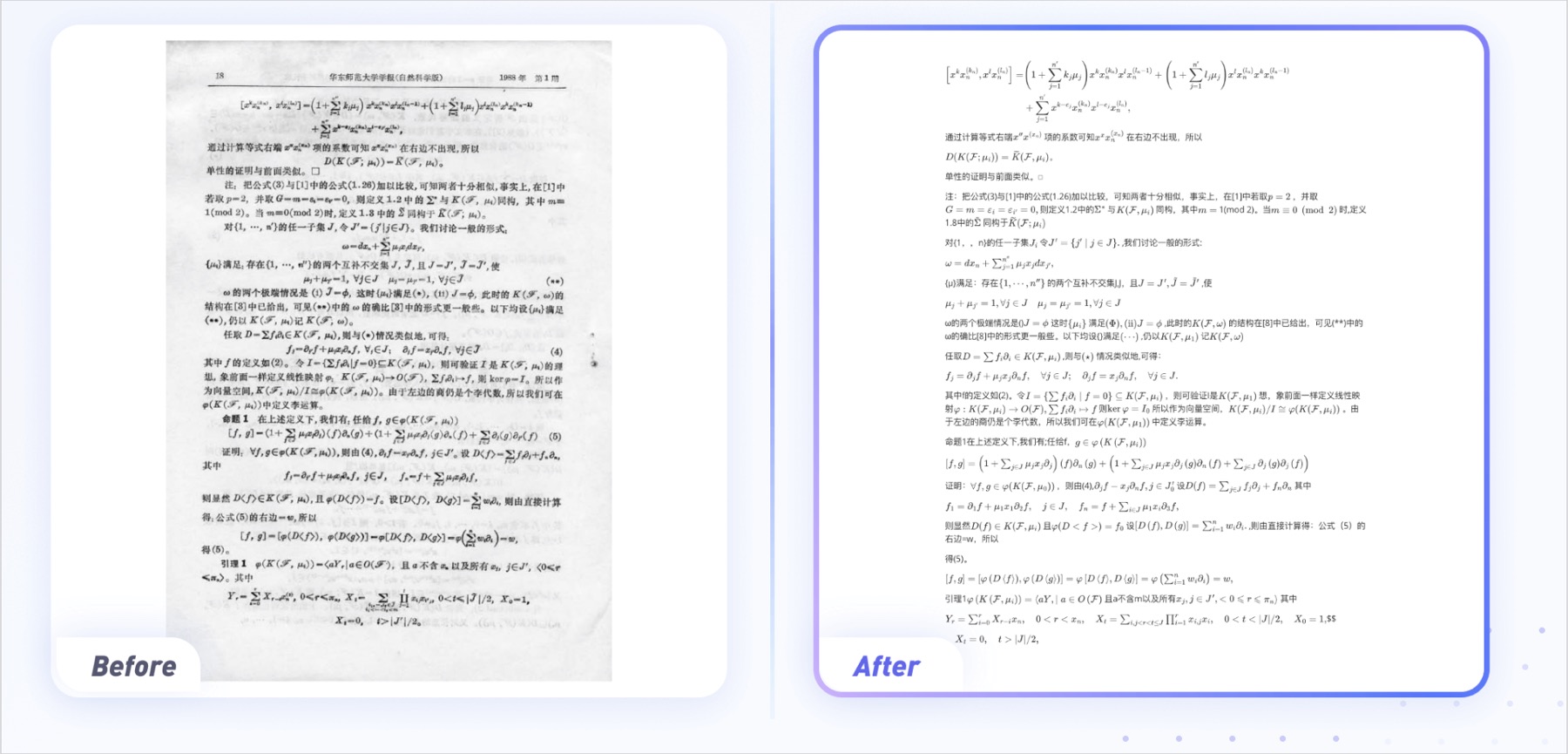
It currently claims the top spot on OmniDocBench v1.6 at 96.33%, and also sets new records on OmniDocBench v1.5 and Real5-OmniDocBench, outscoring Gemini 3 Pro, MinerU2.5-Pro, GLM-OCR, Qwen3-VL-235B, dots.ocr, DeepSeek-OCR2, MonkeyOCR-pro-3B, GPT-5.2, and Dolphin-1.5 in their own published comparison.
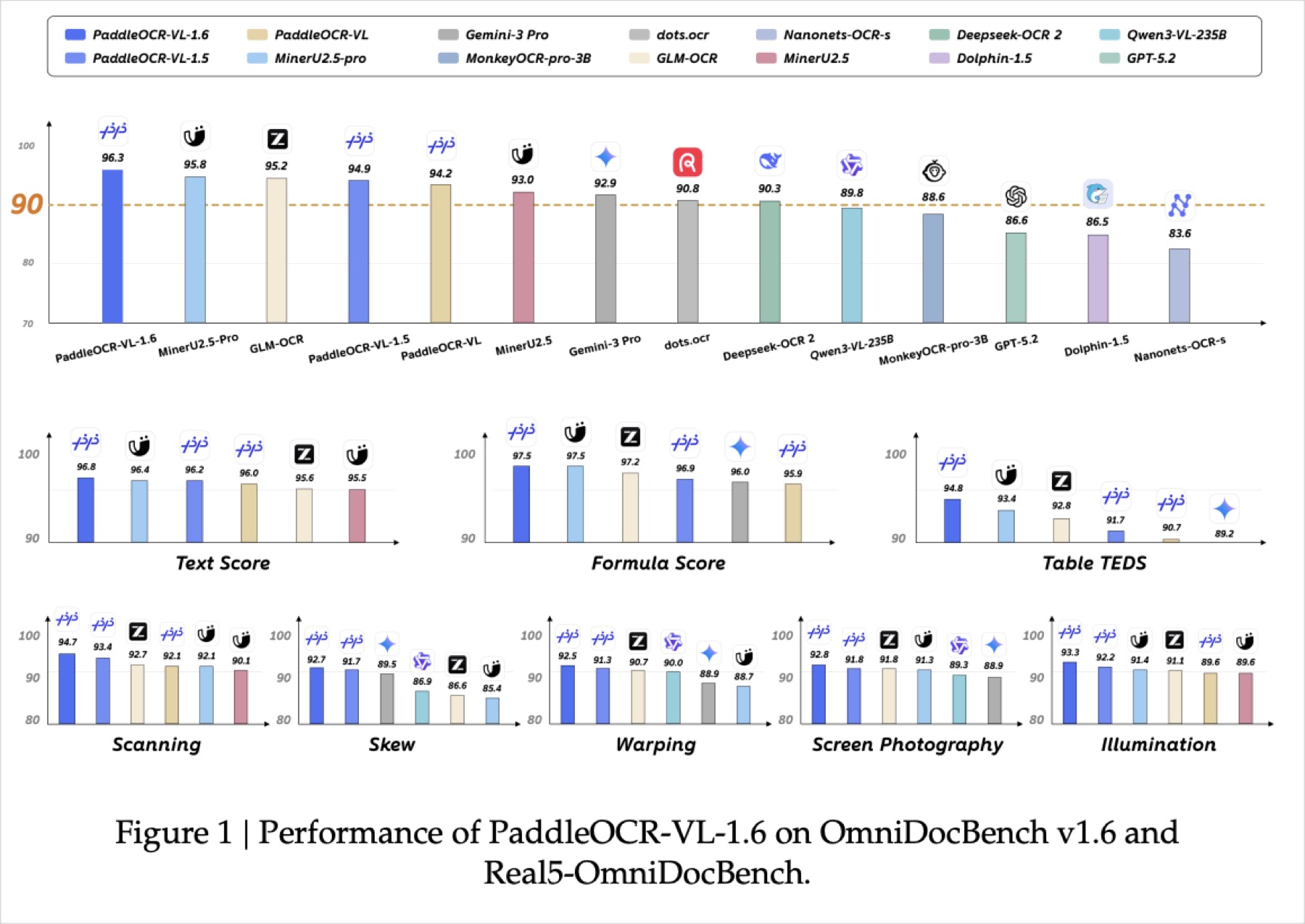
Right now this is the highest-scoring compact model on this list, so if raw accuracy is your priority and you're already in the Paddle ecosystem, it's the one to benchmark first.
A practical method for improving extraction accuracy
Object data extraction is itself a niche, but it's always worth adding to your skill set. If you're an AI engineer, a machine learning engineer, or anyone working on similar problems, you'll understand that image data extraction can be very tedious. Sometimes, across all the runs you do, things can go wrong, and I think the problem usually comes down to memory management, since these documents can be quite notorious in terms of their size. If you're not careful, you can run into CUDA out-of-memory errors again and again.
One piece of advice I'll give is this: understand the area of extraction before you even start extracting.
Here's what I mean. I was working on one of my projects in the organization where I worked, and it involved photographs. My part of the extraction was just one particular segment, roughly 20% of the entire document, and the document itself was about 3,000 by 3,000 pixels, which is a fairly large image.
Earlier, I used a simple PaddleOCR model, PaddleOCR Mobile V5 recognition, and I was seeing frequent CPU spikes and heavy latency because of it. Later, I realized that instead of feeding the entire image just to extract one particular value, I could crop out only the relevant portion. My fix was simple: using OpenCV, I just cropped the bottom 30% of the image, and the problem was solved. Now I extract just that value directly, run it through a regex function to pull out order numbers, dates, times, and so on, and I'm done.
You don't always need a mission-critical, high-fidelity model. Sometimes a bit of clever engineering is all it takes to get the job done.
Conclusion
Every extraction problem is unique, so the real skill is not memorizing one perfect pipeline; it is diagnosing what your document actually needs before reaching for a model. Ask what portion of the document matters, how much preprocessing can do before the model sees the image, and whether a smaller approach can solve most of the problem without the overhead of a larger one. Targeted engineering such as cropping, regex, or simple heuristics will often get you further than immediately choosing a bigger model. Start small, understand your data, and scale up only when you have shown that you need to.